Cats Herd You

Laugh. Learn. Love cats.

  • Home
  • Safety
  • Wellness
  • Rescue
  • Reviews
  • Life With Cats
  • About
  • Media Friendly
  • Contact

Weekend Meltdown

Newton: The hots are here! Weather outside this holiday weekend is supposed to be the hottest it has been in several years.

Newton on ottoman

I have too much fur for hot weather. Do I look amused?

Newton_on_ottoman_airplane_ears

The only thing for sensible cats to do is nap the day away. Who’s with me?

Newton_on_ottoman_02_sm

Share Share on email
Email
Share on twitter
Twitter
Share on facebook
Facebook
Share on pinterest
Pinterest
Share on google
Google
Share on tumblr
Tumblr
Share on linkedin
Linkedin

May 25, 2014 Filed Under: Cats Tagged With: Newton 28 Comments

Caturday Art: Step by Step Edition

One of the things we heard in comments for our previous Caturday Art posts was that everything sounded hard to create in Photoshop, and that the videos we pointed to on YouTube were hard to follow. So we decided to take you on the journey of creating our image for the Caturday Art blog hop today.

We use Photoshop Elements 10, which is a slightly older version, but its big brother Photoshop is similar enough that you ought to be able to follow along whichever you have. For this project, we chose a photo of Ashton sitting in the window that Aunt O took with her new camera.

01_ash_cropped_sm

Duplicate the layer that the image is on. You can do this by right-clicking the layer in the palette and selecting Duplicate Layer. A new layer, named Background copy is added to the palette.

Layer Palette - duplicate layer

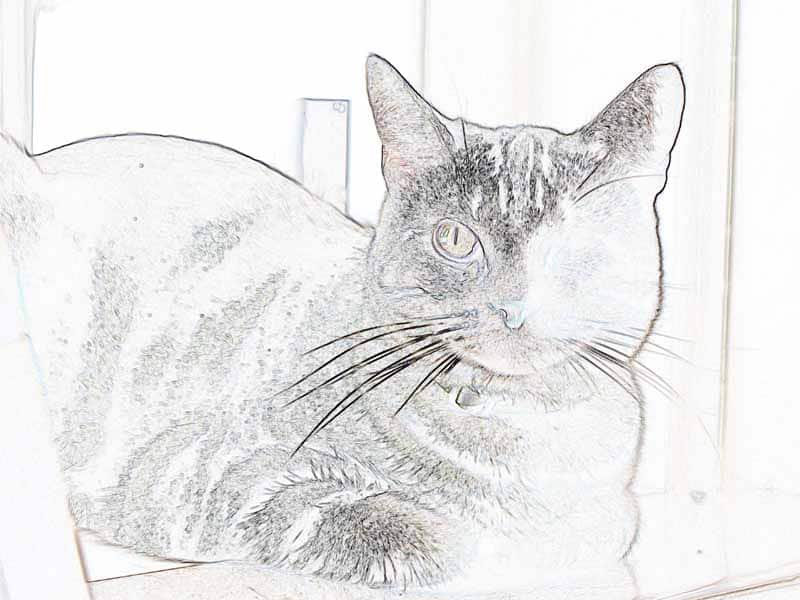
Click the Background Copy 2 layer in the Layers palette to make sure it’s your working layer. Then select Filter > Stylize > Glowing Edges. You can use the preview to play around with the result so that you have nice, thick outlines around the outside of your image before running the filter on your image. The result looks like Ashton is hanging out under a black light.

03_ash_glowing_edges_sm

Is Ashton going to a rave?

No, we’re going to use this outlined image like a sketch by reversing the colors. Select the whole image (Select > All or Ctrl+A) and then invert colors (Filter > Adjustments > Invert or Ctrl+I).

04_ash_invert_sm

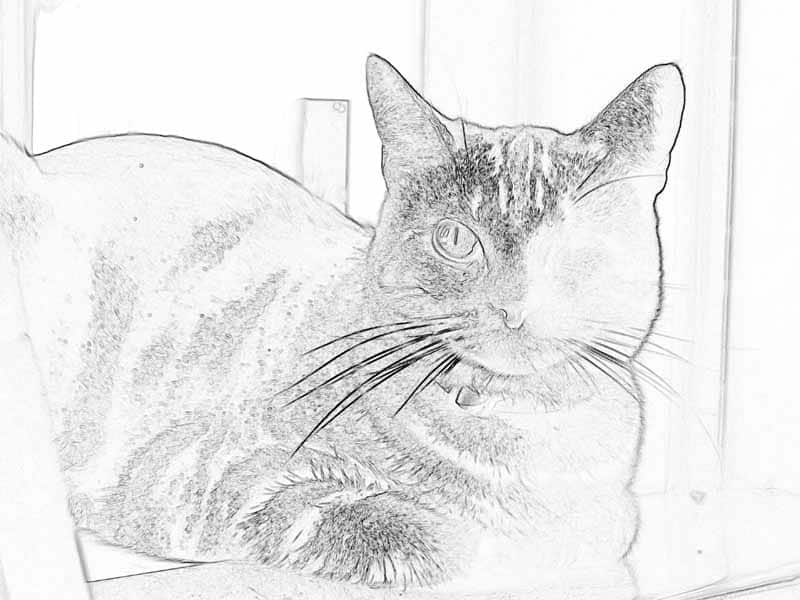
This is a kind of neat effect, like you drew it with colored pencils. But we aren’t done yet! Let’s take the color out of this so that it looks like a black and white sketch instead by selecting Enhance > Adjust Color> Remove Color (or Shift+Ctrl+U).

05_ash_remove_color_sm

Now we have a black and white sketch of Ashton hanging out. Let’s color it in a bit.

In the Layers Palette, click the eye icon for the Background Copy layer to hide it. You will see the original image on the Background layer again. Right-click the Background layer on the Layers palette and select Duplicate Layer. This time, the new layer is named Background copy 2, since there is already a Background copy layer.

Layers_palette_third_layer

Click the Background copy 2 layer to make it the active layer, and choose Filter > Brush Strokes > Spatter. Use the slider controls for the filter and the preview window to get a nice, diffuse image. You probably want to turn the Spray Radius up and the Smoothness down for a nice effect.

02_ash_spatter_sm

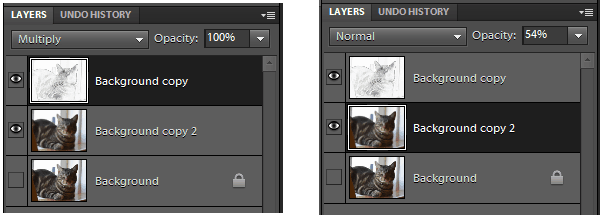
Now you have a black and white outlined layer and a blurry layer of the same image. Let’s combine them. Click the eye icon next to the Background layer to hide it. Nothing actually changes on the screen when you do this, since it is currently hidden behind the blurry image.

Click the eye icon next to the Background copy layer to display it. The black and white image covers up the blurry colored image. Click Background copy in the Layers palette to activate it and select Multiply from the mode menu right above the layer on the palette. This makes the white parts of the layer transparent so that the outline overlays the blurry colored layer below.

Layers_Palettes

Click Background copy 2 in the Layers palette to activate it, and change the opacity to something like 50%. The already blurry image of Ashton becomes lighter, as if it was painted with watercolor.

06_ash_layer_tweaks_sm

How was that? Was that really hard? You can do it! The fun thing about using layers and effects is that you can combine them in lots of different ways to get fun effects.

If you want more tutorials, our friend Sparkle has done some great tutorials for previous Caturday Art weeks, with lots of different effects you can try.

Share Share on email
Email
Share on twitter
Twitter
Share on facebook
Facebook
Share on pinterest
Pinterest
Share on google
Google
Share on tumblr
Tumblr
Share on linkedin
Linkedin

May 24, 2014 Filed Under: Cats Tagged With: Ashton, Caturday Art 21 Comments

Flashback Friday: Boys on the Cat Tree

Today’s flashback takes us back to January 2009, just weeks after Newton joined the household.

Pierre: Would you please tell this kitten that he’s in my spot?

Newton and Pierre on Cat Tree

Newton has been stealing Pierre’s favorite napping spots ever since.

We hope you have some really good napping spots picked out for this upcoming weekend, especially if it’s a long weekend for you and your family!

Share Share on email
Email
Share on twitter
Twitter
Share on facebook
Facebook
Share on pinterest
Pinterest
Share on google
Google
Share on tumblr
Tumblr
Share on linkedin
Linkedin

May 23, 2014 Filed Under: Cats Tagged With: Newton, Pierre 27 Comments

Warm Weather Travel Safety: Pets in Hot Cars

Warm weather has arrived all over the country. (Except maybe for our friend Crepes who had snow last week, but Chicago doesn’t count.) With warm weather comes something we all need to remember: never leave a pet in a parked vehicle.

You’re probably thinking that this is a cat blog, and dogs in parked cars are the real problem. Why are we even talking about it here? The head peep helps drive transports when cats need to be moved through the state. Many of our readers work in rescue, and may have to bring cats to adoption events weekly. And, let’s face it, nearly all of us have to go to the vet sometime, unless we are lucky enough to have a vet who makes housecalls. So remembering safety in cars is important for all of us.

Ashton_Peers_out_of_carrier001_sm

Oh, it’s not too hot out. I’ll just leave a window cracked while I run into the store!

A study published in the Official Journal of the American Academy of Pediatrics about the potential for heat stress on children in cars tested the temperature rise in a car in weather ranging from 72 to 96 degrees Fahrenheit. The study found that regardless of the outside ambient temperature, the rate of temperature rise inside the car was not very different. The average increase was 3.2 degrees Fahrenheit every 5 minutes, with 80% of the temperature rise occurring during the first 30 minutes. The average increase in temperature inside the car was 40 degrees Fahrenheit.

thermometer_rising_half_to_full

Leaving the windows open 1.5 inches didn’t help decrease the rate of the temperature rise in the car very much. Instead of 3.9 degrees every five minutes, the temperature inside the car rose 3.1 degrees every five minutes. The final temperature inside the car was the same whether the windows were completely closed or cracked open.

Why do cars heat up so much on even moderate days?

Cars create what is known as the greenhouse effect. Glass is transparent to solar radiation at short wavelengths, so short-wavelength IR (infrared) radiation passes through the car windows into the vehicle. Everything in the car absorbs the short-wave IR (infrared) radiation (dashboard, steering wheel, seats, etc.) becomes warmer. The warmed objects inside the ar give off long-wavelength infared light. The glass of the car is not transparent to long-wavelength IR, so instead of allowing it to pass through like it did the energy from the sun, it absorbs it and emits it back into the car.

The head peep will admit it… she has left us in an unattended car before. When we have early morning vet appointments, there’s a nearby coffee shop with parking in the shade of the building, and she has run in to pick up coffee. Now that she has read these numbers, it won’t ever be happening again, even if the car is in the full shade of the early morning. Our safety is more important than a latte!

What can you do if you see an animal locked in a parked car?

Since not everyone realizes how quickly parked cars can become dangerous, pets may still be left in parked cars by well-intended owners. What can you do to help if you see an animal locked in a parked car, especially on a hot day?

  1. Try to locate the car’s owner. Hopefully, they are nearby and will respond quickly when you start looking for them.
  2. Go to the security office or store manager for nearby shops and ask them to page the person that owns the car. Stay with the car to be sure that the owner returns.
  3. Call 911. If local security cannot help you, call the authorities for assistance. Fourteen states have laws against leaving pets unattended in vehicles, and even if your state doesn’t have that law, animal cruelty laws may apply to the situation, so don’t hesitate to ask for help for a trapped pet, especially if they are showing signs of heat distress.

Danger_Dog_in_Parked_Car_sm

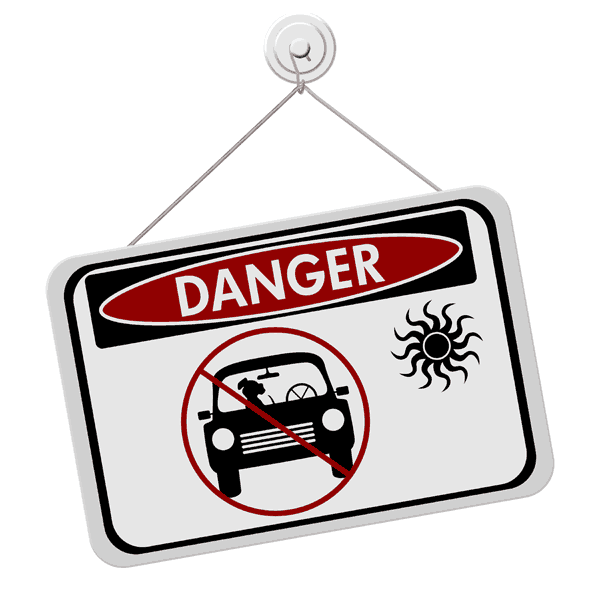
Keep safety in mind whenever animals go along for the ride in warm weather!


References:
The Do it Yourself Greenhouse, How do Greenhouses Work?
Journal of the American Academy of Pediatrics, Heat Stress from Enclosed Vehicles Moderate Ambient Temperatures Cause Significant Temperature Rise in Enclosed Vehicles
PAWS Animal Adoption Center, What to do if You Find an Animal Locked in a Hot Car
Animal Legal and Historical Center, Table of State Laws that Protect Animals Left in Locked Vehicles

Share Share on email
Email
Share on twitter
Twitter
Share on facebook
Facebook
Share on pinterest
Pinterest
Share on google
Google
Share on tumblr
Tumblr
Share on linkedin
Linkedin

May 22, 2014 Filed Under: Safety Tagged With: dogs in hot cars, pets in parked cats, Safety 18 Comments

  • « Previous Page
  • 1
  • …
  • 235
  • 236
  • 237
  • 238
  • 239
  • …
  • 494
  • Next Page »

Read Ashton’s Story in Rescued, Volume 2

These pawtographed books support Candy's Cats, who work tirelessly to find homes for cats in Florida.

Rescued, Volume 2: The Healing Stories of 12 Cats, Through Their Eyes. Proceeds from authographed copies benefit Candy's Cats.


Outside the US, contact us for shipping to your location.

Read Us by Email

Don't miss a thing! Cats delivered to your email.

Privacy Policy


Archives

All Rights Reserved

Articles and images on this site may not be reproduced in whole or in part without written consent. Please contact me if you are interested in reprinting or in having me write something unique for you.

Disclaimer

There are no veterinarians here. All health-related posts are the result of research and observation, but educational information is not a substitute for visiting your veterinarian. Do not self-diagnose your cat. For more information, see our disclaimer.

Policies

Disclosure Statement
Privacy Policy
Commenting Policy

Copyright © 2026 · Sometimes Cats Herd You · All Rights Reserved