Cats Herd You

Laugh. Learn. Love cats.

  • Home
  • Safety
  • Wellness
  • Rescue
  • Reviews
  • Life With Cats
  • About
  • Media Friendly
  • Contact
You are here: Home / Archives for Cats

Happy Memorial Day

Newton: As official spokescat, I’m pleased to report that none of us would pose with anything remotely patriotic for a Memorial Day photo today. We know that cats everywhere will be proud of us for holding out and napping instead of posing obediently.

Newton holding flag

Wait, what’s in that picture? Foiled again!

Happy Memorial Day, and thank you to everyone who has served our country.


I also wanted to say a special thank you to Chey’s Mom for getting the head peep started with a blog redesign. As you can see, she got pretty far with it this weekend. She will still be tinkering with it for a little while, so if you notice she has broken something, please let us know so that we can give her a hard time about it.

Share Share on email
Email
Share on twitter
Twitter
Share on facebook
Facebook
Share on pinterest
Pinterest
Share on google
Google
Share on tumblr
Tumblr
Share on linkedin
Linkedin

May 26, 2014 Filed Under: Cats Tagged With: Memorial Day, Newton 23 Comments

Weekend Meltdown

Newton: The hots are here! Weather outside this holiday weekend is supposed to be the hottest it has been in several years.

Newton on ottoman

I have too much fur for hot weather. Do I look amused?

Newton_on_ottoman_airplane_ears

The only thing for sensible cats to do is nap the day away. Who’s with me?

Newton_on_ottoman_02_sm

Share Share on email
Email
Share on twitter
Twitter
Share on facebook
Facebook
Share on pinterest
Pinterest
Share on google
Google
Share on tumblr
Tumblr
Share on linkedin
Linkedin

May 25, 2014 Filed Under: Cats Tagged With: Newton 28 Comments

Caturday Art: Step by Step Edition

One of the things we heard in comments for our previous Caturday Art posts was that everything sounded hard to create in Photoshop, and that the videos we pointed to on YouTube were hard to follow. So we decided to take you on the journey of creating our image for the Caturday Art blog hop today.

We use Photoshop Elements 10, which is a slightly older version, but its big brother Photoshop is similar enough that you ought to be able to follow along whichever you have. For this project, we chose a photo of Ashton sitting in the window that Aunt O took with her new camera.

01_ash_cropped_sm

Duplicate the layer that the image is on. You can do this by right-clicking the layer in the palette and selecting Duplicate Layer. A new layer, named Background copy is added to the palette.

Layer Palette - duplicate layer

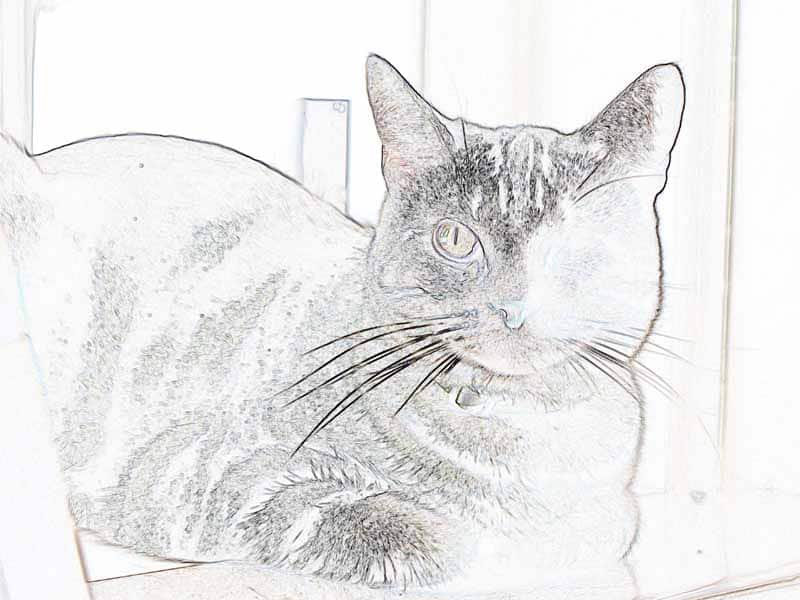
Click the Background Copy 2 layer in the Layers palette to make sure it’s your working layer. Then select Filter > Stylize > Glowing Edges. You can use the preview to play around with the result so that you have nice, thick outlines around the outside of your image before running the filter on your image. The result looks like Ashton is hanging out under a black light.

03_ash_glowing_edges_sm

Is Ashton going to a rave?

No, we’re going to use this outlined image like a sketch by reversing the colors. Select the whole image (Select > All or Ctrl+A) and then invert colors (Filter > Adjustments > Invert or Ctrl+I).

04_ash_invert_sm

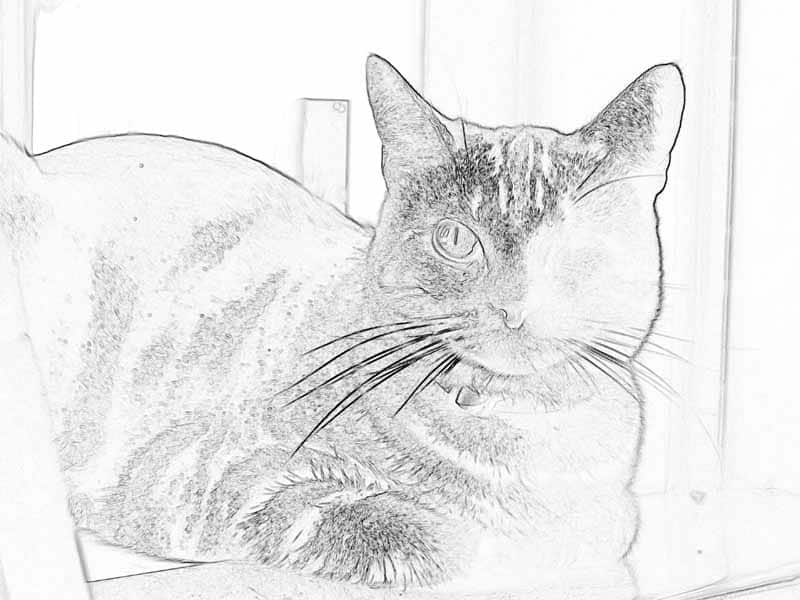
This is a kind of neat effect, like you drew it with colored pencils. But we aren’t done yet! Let’s take the color out of this so that it looks like a black and white sketch instead by selecting Enhance > Adjust Color> Remove Color (or Shift+Ctrl+U).

05_ash_remove_color_sm

Now we have a black and white sketch of Ashton hanging out. Let’s color it in a bit.

In the Layers Palette, click the eye icon for the Background Copy layer to hide it. You will see the original image on the Background layer again. Right-click the Background layer on the Layers palette and select Duplicate Layer. This time, the new layer is named Background copy 2, since there is already a Background copy layer.

Layers_palette_third_layer

Click the Background copy 2 layer to make it the active layer, and choose Filter > Brush Strokes > Spatter. Use the slider controls for the filter and the preview window to get a nice, diffuse image. You probably want to turn the Spray Radius up and the Smoothness down for a nice effect.

02_ash_spatter_sm

Now you have a black and white outlined layer and a blurry layer of the same image. Let’s combine them. Click the eye icon next to the Background layer to hide it. Nothing actually changes on the screen when you do this, since it is currently hidden behind the blurry image.

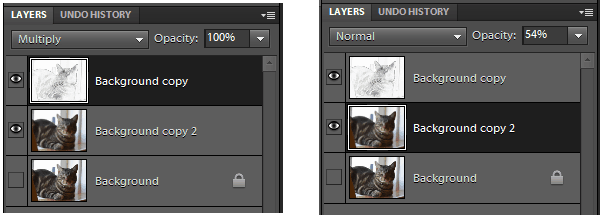
Click the eye icon next to the Background copy layer to display it. The black and white image covers up the blurry colored image. Click Background copy in the Layers palette to activate it and select Multiply from the mode menu right above the layer on the palette. This makes the white parts of the layer transparent so that the outline overlays the blurry colored layer below.

Layers_Palettes

Click Background copy 2 in the Layers palette to activate it, and change the opacity to something like 50%. The already blurry image of Ashton becomes lighter, as if it was painted with watercolor.

06_ash_layer_tweaks_sm

How was that? Was that really hard? You can do it! The fun thing about using layers and effects is that you can combine them in lots of different ways to get fun effects.

If you want more tutorials, our friend Sparkle has done some great tutorials for previous Caturday Art weeks, with lots of different effects you can try.

Share Share on email
Email
Share on twitter
Twitter
Share on facebook
Facebook
Share on pinterest
Pinterest
Share on google
Google
Share on tumblr
Tumblr
Share on linkedin
Linkedin

May 24, 2014 Filed Under: Cats Tagged With: Ashton, Caturday Art 21 Comments

Flashback Friday: Boys on the Cat Tree

Today’s flashback takes us back to January 2009, just weeks after Newton joined the household.

Pierre: Would you please tell this kitten that he’s in my spot?

Newton and Pierre on Cat Tree

Newton has been stealing Pierre’s favorite napping spots ever since.

We hope you have some really good napping spots picked out for this upcoming weekend, especially if it’s a long weekend for you and your family!

Share Share on email
Email
Share on twitter
Twitter
Share on facebook
Facebook
Share on pinterest
Pinterest
Share on google
Google
Share on tumblr
Tumblr
Share on linkedin
Linkedin

May 23, 2014 Filed Under: Cats Tagged With: Newton, Pierre 27 Comments

  • « Previous Page
  • 1
  • …
  • 178
  • 179
  • 180
  • 181
  • 182
  • …
  • 429
  • Next Page »

Read Ashton’s Story in Rescued, Volume 2

These pawtographed books support Candy's Cats, who work tirelessly to find homes for cats in Florida.

Rescued, Volume 2: The Healing Stories of 12 Cats, Through Their Eyes. Proceeds from authographed copies benefit Candy's Cats.


Outside the US, contact us for shipping to your location.

Read Us by Email

Don't miss a thing! Cats delivered to your email.

Privacy Policy


Archives

All Rights Reserved

Articles and images on this site may not be reproduced in whole or in part without written consent. Please contact me if you are interested in reprinting or in having me write something unique for you.

Disclaimer

There are no veterinarians here. All health-related posts are the result of research and observation, but educational information is not a substitute for visiting your veterinarian. Do not self-diagnose your cat. For more information, see our disclaimer.

Policies

Disclosure Statement
Privacy Policy
Commenting Policy

Copyright © 2026 · Sometimes Cats Herd You · All Rights Reserved